KVM servers, billed by the hour.
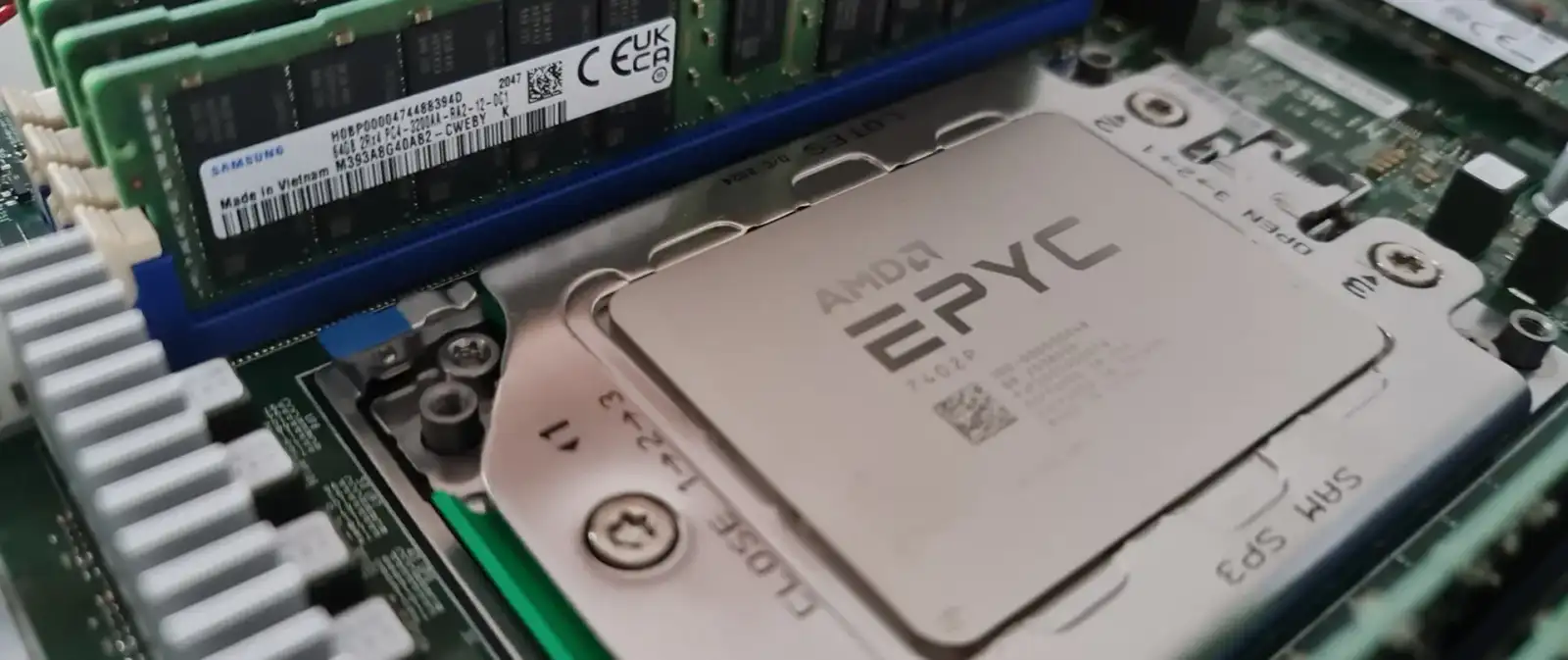
Own kernel, full root access, AMD EPYC and Ceph block storage on NVMe.
from €3.99 per month or €0.0059 per hour, at most the monthly price, incl. 19% VAT
Plans
Uplink 10 Gbit/s · 100 % CPU usage allowed, also sustained
| Plan | vCPU | RAM | NVMe | Traffic | IPv4 · IPv6 | per hour | max. per month | Order |
|---|---|---|---|---|---|---|---|---|
| MP12 | 12 | 48 GB | 600 GB | 10 TB | 1 · /64 | €0.1577 | €105.99 | Order |
| MP16 | 16 | 64 GB | 800 GB | 10 TB | 1 · /64 | €0.2098 | €140.99 | Order |
| MP24 | 24 | 96 GB | 1000 GB | 10 TB | 1 · /64 | €0.3155 | €211.99 | Order |
| MP32 | 32 | 128 GB | 1200 GB | 10 TB | 1 · /64 | €0.4196 | €281.99 | Order |
MP12
- vCPU
- 12
- RAM
- 48 GB
- NVMe
- 600 GB
- Traffic
- 10 TB
max. €105.99 / month€0.1577 / hour
OrderMP16
- vCPU
- 16
- RAM
- 64 GB
- NVMe
- 800 GB
- Traffic
- 10 TB
max. €140.99 / month€0.2098 / hour
OrderMP24
- vCPU
- 24
- RAM
- 96 GB
- NVMe
- 1000 GB
- Traffic
- 10 TB
max. €211.99 / month€0.3155 / hour
OrderMP32
- vCPU
- 32
- RAM
- 128 GB
- NVMe
- 1200 GB
- Traffic
- 10 TB
max. €281.99 / month€0.4196 / hour
Order
Billed per started hour, at most the monthly price, no minimum term. Prices for Germany: incl. 19% VAT.
Prepayment when ordering: 6 months −2.5%, 12 months −5%.
Uplink 10 Gbit/s · 100 % CPU usage allowed, also sustained
| Plan | vCPU | RAM | NVMe | Traffic | IPv4 · IPv6 | per hour | max. per month | Order |
|---|---|---|---|---|---|---|---|---|
| GP12 | 12 | 48 GB | 600 GB | 10 TB | 1 · /64 | €0.2128 | €142.99 | Order |
| GP16 | 16 | 64 GB | 800 GB | 10 TB | 1 · /64 | €0.2835 | €190.50 | Order |
| GP24 | 24 | 96 GB | 1000 GB | 10 TB | 1 · /64 | €0.4248 | €285.49 | Order |
| GP32 | 32 | 128 GB | 1200 GB | 10 TB | 1 · /64 | €0.5662 | €380.49 | Order |
GP12
- vCPU
- 12
- RAM
- 48 GB
- NVMe
- 600 GB
- Traffic
- 10 TB
max. €142.99 / month€0.2128 / hour
OrderGP16
- vCPU
- 16
- RAM
- 64 GB
- NVMe
- 800 GB
- Traffic
- 10 TB
max. €190.50 / month€0.2835 / hour
OrderGP24
- vCPU
- 24
- RAM
- 96 GB
- NVMe
- 1000 GB
- Traffic
- 10 TB
max. €285.49 / month€0.4248 / hour
OrderGP32
- vCPU
- 32
- RAM
- 128 GB
- NVMe
- 1200 GB
- Traffic
- 10 TB
max. €380.49 / month€0.5662 / hour
Order
Billed per started hour, at most the monthly price, no minimum term. Prices for Germany: incl. 19% VAT.
Prepayment when ordering: 6 months −2.5%, 12 months −5%.
Pay by credit card (also Apple Pay and Google Pay), PayPal or cryptocurrencies.


What matters before buying
AMD EPYC
Milan or Genoa, depending on the hardware generation. vCPUs are shared in the Shared plans; the Pro plans allow 100 % usage.
IPv4 and IPv6
1 IPv4 address included, plus a dedicated /64, switched.
Ready in minutes
Set up automatically; stock is shown live.
Prepayment
Up to 5% off for prepayment.
DDoS protection up to 3.2 Tbit/s
Through SYNLINQ, active automatically.
Support Mon–Fri 8 am–4 pm CET/CEST
Emergency line +49 69 247 479 340 for outages, status page status.ph24.io.
No ID check needed to order (except when paying by invoice). From 250 € in 30 days, a complete billing profile is required.
More: Hourly billing explained
What KVM means: What is a KVM server?
Supported operating systems
Chosen when ordering or reinstalling; login by SSH key or root password.
 Ubuntu22.04 · 24.04 · 26.04

 AlmaLinux8 · 9 · 10
 Rocky Linux8 · 9
 CloudLinux8 · 9
 openSUSE MicroOSRolling release
 Windows Server2022 · 2025 · with your own licence (BYOL)


ISO library: more than 150 ISO images, rescue systems included
Other systems can be installed manually from an ISO in the library through the browser console.
- Rescue and tools
- ph-rescue (by ph24), SystemRescue, GRML, Clonezilla, GParted, Rescuezilla, netboot.xyz
- Linux
- AlmaLinux, Rocky Linux, CloudLinux, Debian, Ubuntu, Fedora, openSUSE/SLE, Arch, Alpine, NixOS, Gentoo, Kali, Mint …
- BSD, firewall and router
- FreeBSD 13–15, OpenBSD, OPNsense, pfSense, VyOS, IPFire
- Virtualization
- Proxmox VE, XCP-ng, Harvester, ESXi – nested virtualization is on
- Containers and Kubernetes
- Talos, Flatcar, Fedora CoreOS, k3OS
- Windows and commercial software
- Windows Server 2012–2025 and more – with your own licence
The server in the customer area
Everything needed to run it, included at no extra cost.
Browser console (noVNC)
The server's screen right in the browser, even when SSH or the network is down. With Ctrl+Alt+Del, full screen and "Type text", which types a long password key by key, for example.
ISO drives
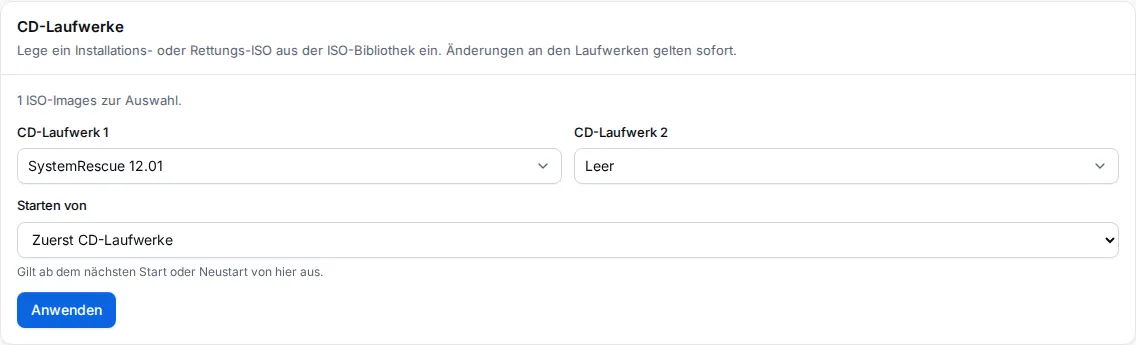
Two virtual CD drives with more than 150 ISO images from the library, rescue systems included. The server boots from disk or CD, as selected.
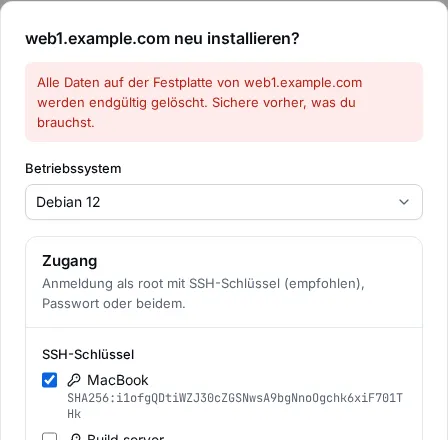
Reinstall and rescue
Reinstall with another system in a few minutes; IP addresses and hostname stay. If the server won't boot, a rescue ISO or a command through the guest agent helps, without SSH.
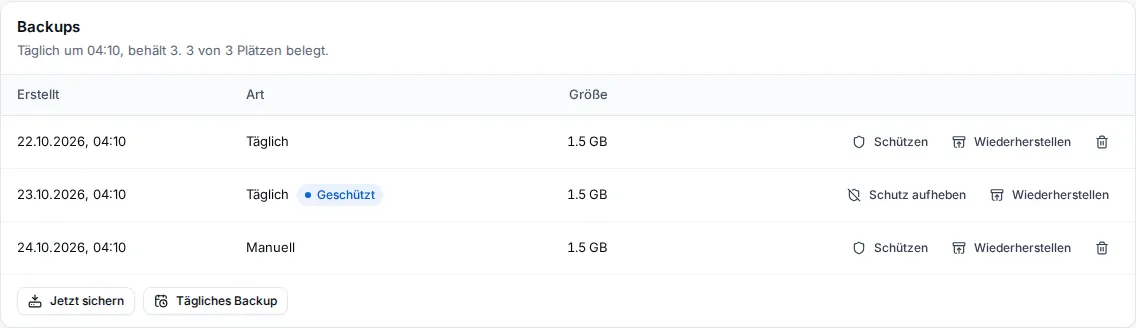
Backups
An automatic backup every day, 3 slots included, more available. Time and number are adjustable, important backups can be protected, and "Back up now" works any time.
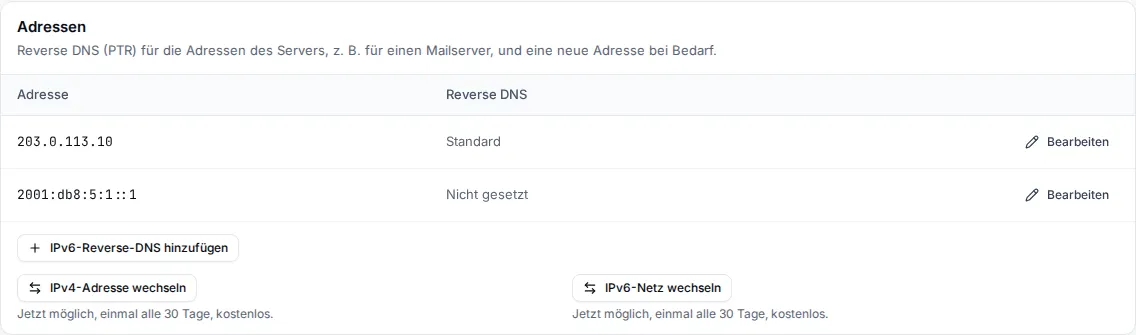
Network: IPv6, rDNS, new IP
One IPv4 address and a dedicated /64 IPv6 network (switched). Reverse DNS is self-service; the IPv4 and the /64 can be swapped for new ones for free once every 30 days.
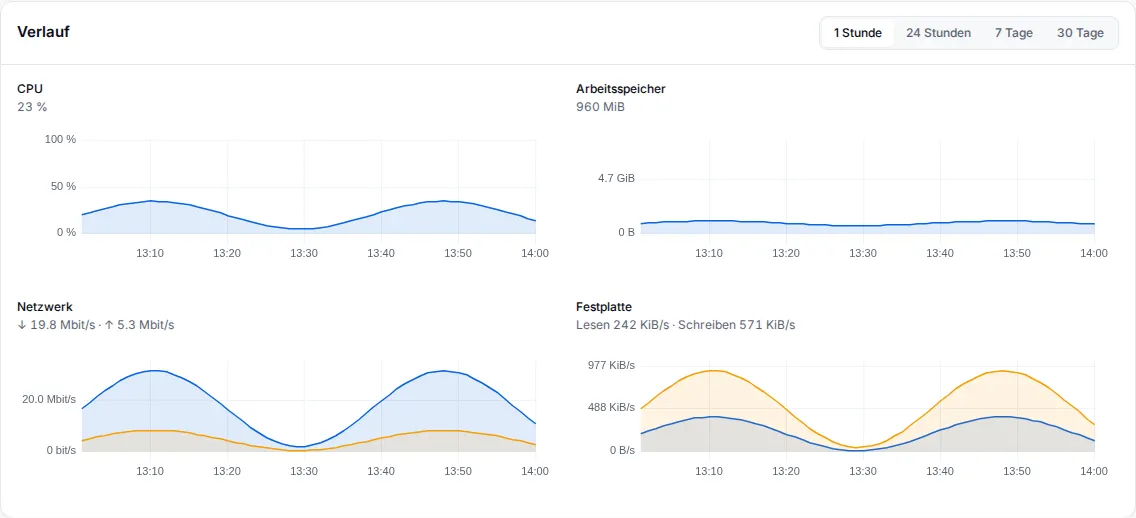
Live values and automation
CPU, memory, disk and network graphs with live values every second, a traffic forecast, scheduled reboots and commands through the guest agent.
Screenshots: the customer area with example data (in German).
Test the network yourself
Try the looking glass in Frankfurt before ordering.
- Test files: 10 MB, 100 MB, 1 GB, 10 GB
- iperf3 for throughput
- Ping, MTR and traceroute over IPv4 and IPv6
- Latency history in Smokeping
- Open lg.ph24.io
Everything through the API too
Order servers, reboot them, make backups: whatever works in the customer area works through the API too – versioned (v1), with tokens per project.
Open the API documentationFrequently asked questions
More questions? Contact
For outages, also outside these hours: +49 69 247 479 340.
No minimum term, billed by the hour.
Order a serverDo servers share CPU cores?
In the Shared plans, vCPUs are shared fairly, not dedicated; sustained full load on all cores isn't intended there. The Pro plans allow 100% CPU usage, also sustained.
Which CPU do I get?
The hardware generation decides the CPU: AMD EPYC Milan with DDR4 (e.g. EPYC 7443, 7543, or 7C13) or Genoa with DDR5 (e.g. EPYC 9554). A specific model isn't guaranteed.
How is the server connected, and what happens after 10 TB?
Connection upgradable on request – up to 50 Gbit/s; contact support. 10 TB of traffic per month is included (in and out). Above that, fair use applies: a notice is sent at 80% and 100%, and in exceptional cases the bandwidth is limited until the month ends. Nothing is charged extra. The connection can be tested beforehand with the looking glass at lg.ph24.io.
How is the IPv6 network set up?
The dedicated /64 is switched (on-link), not routed. Further addresses from the /64 are configured in the operating system.
Where is my data?
In Frankfurt, Germany (NTT Frankfurt 2 and maincubes FRA01).
Can I send email directly from the server?
Port 25 is blocked by default and opened on request. Reverse DNS is self-service in the customer area.
Can I use Windows?
Yes, Windows Server 2022 and 2025 – with your own licence (BYOL). Licences are not sold.
Can I upload my own ISO?
Not yet – planned. Until then, more than 150 ISO images in the library are available; if a system is missing, a message to support is enough.
What if my server won't boot?
Open the browser console and boot a rescue system from the ISO library (e.g. ph-rescue, SystemRescue or GRML), or reinstall. If the guest agent runs, commands work without SSH too.
Are there snapshots?
Not yet – planned. Until then, "Back up now" makes a restorable backup at any time.
Is there a firewall in the customer area?
Not yet – planned. Protection against spoofed addresses and DDoS is active; custom rules are set in the system, e.g. with nftables or ufw.
Does virtualization run inside the server (nested)?
Yes, nested virtualization is on.
Can I change plans?
Yes, within the same hardware generation, at any time. CPU and memory apply after the next restart; the disk grows at once and never shrinks.
Do I need to verify my ID?
No. Orders above 250 € in 30 days require a complete billing profile; an ID check is only needed to pay by invoice.
How long until my server runs?
A few minutes after payment, automatically, with no manual review. Every step is shown live.
Since when has ph24 existed, and how is support reached?
Since 2017, on its own infrastructure. Support Mon–Fri 8 am–4 pm CET/CEST; for outages there is the emergency line +49 69 247 479 340.
Can I transfer a server to someone else?
Yes: transferring a server to another customer is free, in the customer area.
Is there a minimum term, and do I get credit back?
No minimum term. Unused credit is refunded on request to the original payment method. More in the guide "Hourly billing explained".
Online in a few minutes.
Create an account, top up, start a server.